
Release Notes · 2026-09
DoorJames, wherever you work - Events, Outlook and your Wallet
Events arrive in DoorJames — with live check-in, badges and sessions — plus a room-booking add-in for Outlook, your badge in Apple Wallet, home-screen widgets on Android and check-in by QR scan.
Events arrive in DoorJames — with live check-in, badges and sessions — plus a room-booking add-in for Outlook, your badge in Apple Wallet, home-screen widgets on Android and check-in by QR scan.
New features
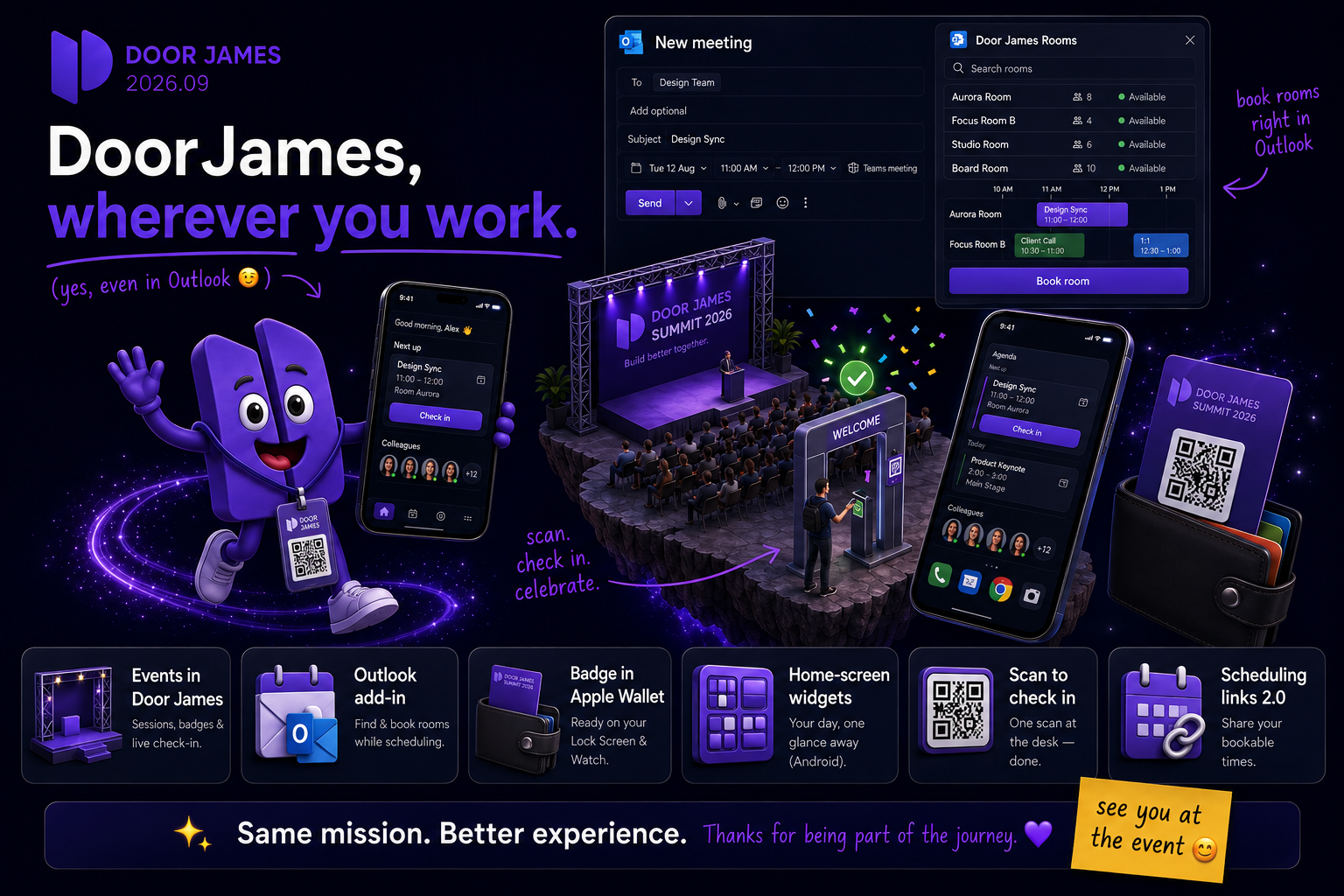
- Events come to DoorJames – Your events and sessions now live on the dashboard and agenda as image-led cards with countdowns and live indicators. Accept or decline invitations with registration forms, browse sessions with times and speaker profiles, find Wi-Fi credentials and event links, and report problems with photos. Your personal badge QR gets you checked in with a scan — confirmed in real time with a little celebration, unlocking the event content instantly.
- Your badge in Apple Wallet – Add your badge and event tickets to Apple Wallet — from the apps or any browser on iPhone and Mac. Passes keep themselves up to date, show your booked sessions, appear on the Lock Screen right when you need them and are always ready on your Apple Watch.
- Book rooms straight from Outlook – The new DoorJames add-in for Outlook lets you find and book meeting rooms while you schedule: search rooms by area, check live availability on a timeline, pick a room from the floor plan, and your meeting time and location stay in sync with the invite.
- Home-screen widgets (Android) – Four new widgets: your agenda with one-tap check-in and check-out, your current booking, your favorite colleagues, and who's in an office of your choice. While a check-in is available or active, a quiet notification keeps your booking within reach.
- Events on your Lock Screen (iOS) – Live events and sessions appear as a Live Activity with countdowns on the Lock Screen and in the Dynamic Island, with a My Badge button that jumps to your badge — and an event card on Apple Watch that shows your badge QR, even offline.
- Scan to check in – Scanning a desk's QR code now checks you in automatically the moment your check-in window is open — and tells you exactly why if it isn't.
- Scheduling links 2.0 – DoorJames Meet scheduling links are now available to everyone, with a live preview while editing, optional validity windows, an activate/deactivate toggle and a smarter public booking page that hides empty days.
- Smarter booking recommendations – Suggestions now learn your personal patterns per weekday — like your usual Thursday desk — respect your working hours, look up to six days ahead and recommend your regular parking spot along with the desk.
- Reworked notifications – Notifications are grouped by day and marked as read while you scroll — seen means read, no more tapping each one. Read notifications tuck behind a toggle.
- Human support for everyone – The support chat in the toolbar now connects you with a human directly, even if your organization has the Jaimes AI assistant turned off.
- Jaimes dresses for the season – The mascot celebrates with you: Santa hat, party hat, bunny ears or sunglasses depending on the time of year — and a settings toggle if you prefer it plain.
- Admin: dark mode & a new event command center – The admin panel gets a full dark mode (following your system preference), and event management is rebuilt around a live dashboard: attendee flow from invited to checked-in, attendance over time, and lists that update in real time — with all event settings consolidated on one tabbed page.
- More admin tools – Multi-select in the floorplan editor, manual floor and area ordering, editing and extending bookings in the usage calendar, DoorJames Screens with a "you are here" map widget and per-widget custom CSS, the admin panel on your own domain with a white-labeled login page, per-option visibility rules in the form builder, custom icons for service bookings and cancellable sticker orders.
Improvements
- Conflicts surfaced before you book – Overlapping bookings in other offices are flagged on the map and in the booking flow before you submit — naming the office and the exact time range.
- Change the desk while editing – Editing a booking no longer locks you to the originally selected desk or room.
- An availability view that adapts – The availability timeline always fits your screen, zooms in around short selections and expands for out-of-hours bookings.
- A fresh look with smooth moves – Cleaner, flatter cards, refined typography, and page changes that morph booking cards, banners and avatars from one page into the next.
- Faster everywhere – Images are cached and compressed smarter (with a "clear cached images" action in settings), duplicate requests are eliminated and the backend starts much faster — snappier maps, banners and photos.
- Accessibility wave – Availability views are fully screen-reader and keyboard operable, dialogs get consistent close controls and focus handling, booking cards announce all their details, and reduced-motion mode is respected across the map and mascot.
- Easier people picking – Adding attendees moved to a full page with search and required/optional choice, name search finds full names reliably, and before you sign in the app follows your browser's language.
- iOS polish – The splash screen swings open like a door, recovers itself from failed loads, CarPlay shows check-in and checkout notifications while driving, and a new Companion Settings overview shows at a glance whether location and notifications are set up right.
Fixes
- Bookings now show their times in the booking's office timezone everywhere — cards, details and the check-in countdown.
- Automatic check-in at the office is far more reliable: lost geofence events, missing GPS fixes and too-small office zones are handled, and stale queued check-ins no longer fire at night.
- Sessions that expire now take you to the login page instead of a silently broken app, and the first launch after an app update clears stale caches so navigation can't go dead.
- Booking approval and decline notifications arrive in all nine languages — including the reason for a decline — and check-in reminders go to the right people in their own language.
- The booking flow no longer prefills a time in the past after your phone was asleep.
- Map interactions no longer break after opening the filter panel, and the office weather widget fits on mobile screens.
- Android: the on-screen keyboard no longer hides search suggestions, and Jaimes' voice replies are audible.
- Booking confirmation emails work for assets without area details, and event email placeholders are filled in reliably (admin).
See the new features live
Release notes tell you what changed. Thirty minutes tells you whether it changes anything for you.