
Release Notes · 2026-10
Book smarter - Slots, teams and recommendations that learn
Fixed booking slots and blocked times, recommendations that learn from you, teams in the app, Jaimes booking for your colleagues — plus Siri and Apple Intelligence on iOS 27.
Fixed booking slots and blocked times, recommendations that learn from you, teams in the app, Jaimes booking for your colleagues — plus Siri and Apple Intelligence on iOS 27.
New features
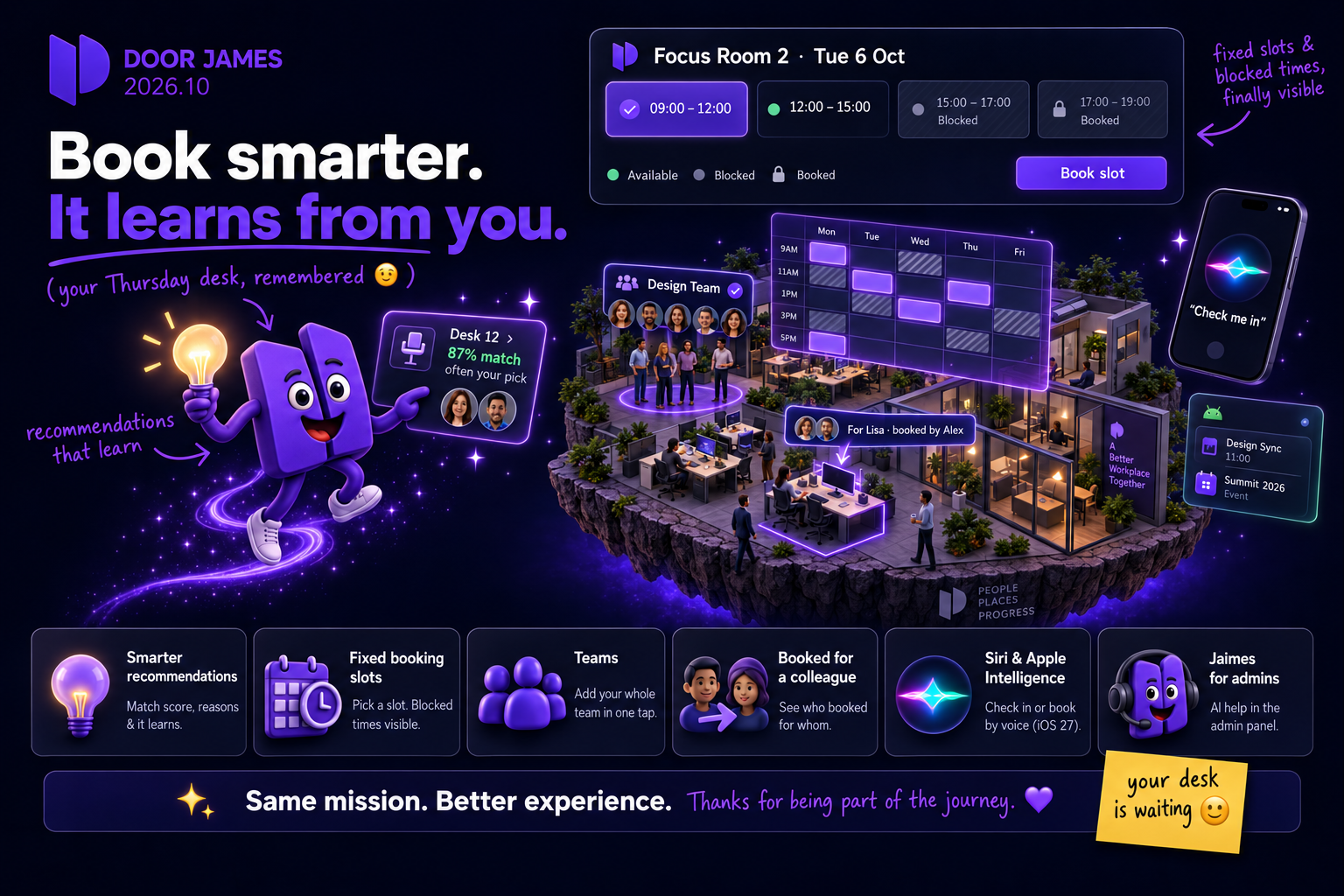
- Booking Recommendations that learn – Recommendation cards in the new-booking dialog now show a match score, the reasons behind a suggestion ("often your pick", colleagues nearby) and adapt over time: suggestions you book gain weight, ones you ignore fade. After booking a desk, DoorJames suggests your usual parking spot right on the confirmation screen. A "How this works" sheet explains the logic and privacy.
- Fixed booking slots – Admins can define weekly bookable time windows for an asset or a whole area — for example 9–12 and 12–17. When you book such an asset you pick a slot instead of dragging a time range, with booked or blocked slots greyed out.
- Blocked times you can see – Assets and areas can now be blocked on a recurring weekly schedule. Both availability views show blocked windows with their reason (past, closed, blocked, booked) so you know exactly when a desk frees up again.
- Teams – Create and manage your own teams in the new Colleagues & Teams hub, and add a whole team as attendees to a meeting with one tap.
- See who booked for whom – Bookings you made for a colleague now appear in your own dashboard, where you can edit, extend or cancel them. Cards show "For …" or "Booked by …" so both sides always know the story.
- Recurring bookings: conflicts, resolved – When a series clashes on some dates, a sheet lists each conflicting date with its reason and lets you book the rest with one tap.
- Booking refusals say why – Instead of "not available for you", DoorJames now tells you the actual reason: blocked asset or area, not on the whitelist, owner-only, outside the sharing window — and whether it is time-bound.
- Jaimes books for your colleagues – Ask Jaimes to book a desk for a teammate: it finds the person, confirms who you mean and books on their behalf.
- Jaimes for admins – The AI assistant arrives in the admin panel with knowledge of offices, areas, bookings, visitors and settings, and hands over to a human when needed. Enabled per organization.
- Siri & Apple Intelligence (iOS 27) – Check in, check out or book your recommendation just by asking — no booking ID needed. Apple Intelligence learns when you usually check in and can suggest it before you ask, and Spotlight results offer check-in right next to the booking.
- Events in your Android widget – Events you attend now appear in the Agenda home-screen widget, chronologically between your bookings.
- Weather in °C or °F – The office weather follows your region automatically, with a manual override in settings.
- Admin: "Who can book?" simulator and smarter rules – Test any member and time to see exactly which rule decides their access. Whitelist rules can be ordered, each with its own advance-booking window. When you tighten a restriction, DoorJames lists only the bookings that actually lose access — widening a whitelist no longer threatens to cancel anything. Also: dark-mode floorplans keep their drawn colors.
Improvements
- Availability timeline with zoom – Zoom from two hours to the whole day with explicit buttons; the view no longer jumps when you change the duration.
- Date & time picker as its own page – Scrolls properly, goes fullscreen on small screens and keeps the confirm button reachable.
- Clearer booking cards – Color-coded status pills, a check-in countdown that turns green when the window opens, and a header that fits on narrow phones.
- Support chat polish – Resolved tickets open as read-only history, statuses follow your app language, "Mark as solved" replaces "Close request", and the widget is fully translated into all nine languages.
- Live Activity on iOS – A small icon-only check-out button prevents accidental check-outs, the design matches the app, and the web app refreshes instantly after a native check-in from Siri, CarPlay or the Lock Screen.
- Android widgets – The check-in button is clearly visible in dark mode, and a location-access explanation appears before the permission prompt.
- Small things – Weekday shown in agenda date headers; seasonal emojis only on the actual holidays; recommendations show "87% match" instead of an "AI" label.
Fixes
- Booking errors now show human-readable, translated messages, and advance-booking limits name the last bookable date.
- Booking for a colleague no longer shows your own bookings as conflicts, and the recurrence rule is no longer dropped when choosing an asset type.
- Restrictions apply consistently: the map no longer shows an asset as bookable after an admin restricted it, floor- and building-level rules are respected, and a scheduled whitelist next to a blacklist no longer locks everyone out.
- Asset photos appear in the asset sheet again, and your own avatar shows on the map regardless of discovery settings.
- Missing icons across the app are gone — icons are now bundled offline.
- Google sign-in no longer resets the language you chose.
- Outlook add-in: fixed the sign-in loop for white-label organizations, plus a hidden reset panel for support.
- iOS: readable status pills on Apple Watch and no more crash during background refresh on iOS 27.
- Android: the widget check-in button performs the action instead of opening the app, automatic office check-in sets itself up correctly on new installs, and the date & time picker layout is fixed.
- Admin: SVG uploads for logo and login image, large floorplan outlines are no longer cropped, and the Jaimes token usage report counts correctly.
- Event e-mails are no longer aborted by Microsoft throttling and never contain "undefined".
See the new features live
Release notes tell you what changed. Thirty minutes tells you whether it changes anything for you.